time
Example Start Reset Connect

ShowMark
↷
↶
The 3x3 cube was invented by Hungarian Ernő Rubic in the 1970s and won great popularity around the world in the 1980s. Although more than 40 years have passed, it is still a classic toy and can be found in toy stores. Frankly speaking, despite a seemingly simple gadget at the first sight, it is actually a very difficult game and very few people can solve it by themselves. But, it is still an interesting game. Why not give it a try, solving it by yourself or with a guide.
Here, you may play a classic Rubik's Cube and a 2X2X2 cube. In addition, several new games of playing cubes, created by Interespace.com, are provided. On how to play these games, you may refer to the right column on each of these pages, or the FAQ page.
time
Click the button Start, two patterned cubes appear at the top-left corner on the canvas. Then rotate the cube to match the two patterns in any order before reaching the final state (pattern A), i.e. all six faces displaying solid colors. A corresponding light changes from gray to green when each of the pattern is achieved.
An example:
Clicking the button Example, the following two patterns appear
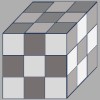
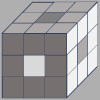
Now you may using the keyboard input "E R D F C V E R", and then the second pattern is achieved. The light under it changes to green.
Then input "U2 I2 J2 K2 N2 M2 N M J K U I N M", and the first pattern is achieved. The light under it changes to green.
Finally input "U2 I2 J2 K2 N2 M2", then the final pattern is achieved. The light on the top right changes to green.
Note: The figure "2" behind a letter means to type that letter twice, e.g., V2 means to type letter V twice.
For more examples, see Examples to play Maze Mini
Note: There are two ways to rotate the cube
1) swipe the screen (or use mouse). For detailed information see How to play cubes?
2) using keyboard with the following keys.
Left-handed rule Right-handed rule
 W, E, R
 U, I, O
 S, D, F
 J, K, L
 X, C, V
 N, M, ","
Function of other buttons
Button Reset sets the cube to initial state.
If there's no operation for a minute, link to server will be disconnected. The Connect/Connected button changes from green to gray. To continue to play, click that button again to reconnect with the server.
Note: Owing to speed limitation of the network, it may not respond quickly enough if you press keys to fast.