How to rotate the cube?
Two ways to rotate the cube:
1) swipe the screen (or use mouse)
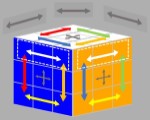 Swipe along the gray arrows (above the cube or in the middle layers of the cube), rotate the cube as a whole.
Swipe along arrows of other colors, rotate one layer of the cube.
Note: Press button "HideMark" to hide the marked regions for swipe above the cube. This will not affect swipe function in these areas.
2) type keyboard with the following keys. [see animation]
Left-handed rule Right-handed rule
 W, E, R
 U, I, O
 S, D, F
 J, K, L
 X, C, V
 N, M, ","
Note:
If there's no operation for a minute, link to server will be disconnected. The Connect/Connected button changes from green to gray. To continue to play, click that button again to reconnect with the server.
Owing to speed limitation of the network, it may not respond quickly enough if you press keys to fast.
What's the relationship between keyboard and conventinal notations?
Maybe you are already familiar with the conventional notations when you play a real cube and so it may take a little time to aquaint youself with the keyboard. There are some advantages of using keyboard. It can be very simple and convenient. For example, you may rotate the cube with only one finger on a computer or a laptop, instead of two hands. When familiar with the keyboard, you may rotate the cube much faster than using mouse or swipe on the screen. In addition, it seems the sequence of letters are easier to remember than the conventional notations.
The relationship between letters on keyboard and the conventional notations are shown in the table. Click button Play to see animation.
| Letter | Notation | Letter | Notation | Letter | Notation |
|---|---|---|---|---|---|
| E | U | U | U' | W | y |
| R | D' | I | D | O | y' |
| D | L' | J | L | S | x |
| F | R | K | R' | L | x' |
| C | F | N | F' | X | z |
| V | B' | M | B | , | z' |
What are basic patterns?
Basic patterns are predefined for one side of a cube.
Here are basic patterns, each of which is assigned a name.
A  O
O  X
X  +
+  H
H
T  Tr
Tr  D
D F
F  S
S 
O, X, +, H, T represent the shape of corresponding pattern.
A--All squares have the same color.
Tr--Triple lines with different color are on one side.
D--Double Ls are on one side.
F--Five colors are on one side with for corners and the center having the same color. Each of the four remaining squares are of different color. Color combination can be different from those on the picture. The figure above gives an example.
S--Six colors are on one side with four corners having the same color. Each of the five remaining squares are of different color. Color combination can be different from those on the picture. The figure above gives an example.
What are cube patterns?
Cube patterns, predefined for each game, are combinations of basic patterns on every side of the cube.
There are a special cube pattern and two groups of cube patterns. The special pattern A usually serves as end point pattern, but in certain games may serve as start pattern as well. The first group is used for Maze E (Elementary). The second group, combined with the first group, is used for Maze S (Standard).
 A: All sides are basic pattern A.
Patterns of the first group are:
 X: All sides are basic pattern X.

 H: All sides are basic pattern H as the left icon shows. Note: the pattern as the right icon shows is NOT taken as predefined cube pattern H, though all sides of it also have basic pattern H.
 4+: Two sides are basic pattern A and the other four sides are basic pattern +.
 4X: Two sides are basic pattern A and the other four sides are basic pattern X.
 4O: Two sides are basic pattern A and the other four sides are basic pattern O.
 2H: Two sides are basic pattern H and the other four sides are basic pattern A.
 2X4+: Two sides are basic pattern X and the other four sides are basic pattern +.
 2X4O: Two sides are basic pattern X and the other four sides are basic pattern O.
 2H4O: Two sides are basic pattern O and the other four sides are basic pattern +.
How to go through a path reversely?
There are six pairs of keys that rotate the same layer of cube in opposite directions. They are:
E-U, R-I, D-J, F-K, C-N, V-M.
Now to go through a path reversely, first reverse the order of all keys of that path, then substitute each key with the other key in that pair.
For Example, suppose you input E, D, C from a certain pattern. To get a reverse path, first reverse the order of the string, you get C, D, E. Then find the other key in each pair, then you get N, J, U. Now, input N, J, U, you go back to that pattern.
Examples to play Maze Mini
There are only three cases in Maze Mini, and solutions to all these cases are given below. You may try to achieve each case in different order. Refer to How to go through a path reversely.
Case 1:
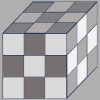
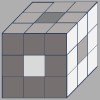
Input "U2 I2 J2 K2 N2 M2" from the keyboard, and the first pattern is achieved. The light under it changes to red.
Note: The figure "2" behind a letter means to type that letter twice.
Then input "E R D F C V E R U2 I2 J2 K2 N2 M2", and the second pattern is achieved. The light under it changes to red.
Finally input "N M J K U I N M", then the final pattern is achieved. The light on the top right changes to white.
Case 2
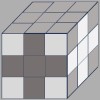
Input "U2 I2 J2 K2 N2 M2", and the first pattern is achieved.
Then input "K2 M2 N2 J2 L K2 M2 N2 J2", and the second pattern is achieved.
Finally input "U2 I2 J2 K2 N2 M2 K2 M2 N2 J2 L K2 M2 N2 J2", then the final pattern is achieved.
Case 3:
Input "K2 M2 N2 J2 L K2 M2 N2 J2", and the second pattern is achieved.
Then input "U2 I2 J2 K2 N2 M2", and the second pattern is achieved.
Finally input "K2 M2 N2 J2 L K2 M2 N2 J2 U2 I2 J2 K2 N2 M2", then the final pattern is achieved.